Overview of the User Interface


CAMI-Apps opens with the following screen:
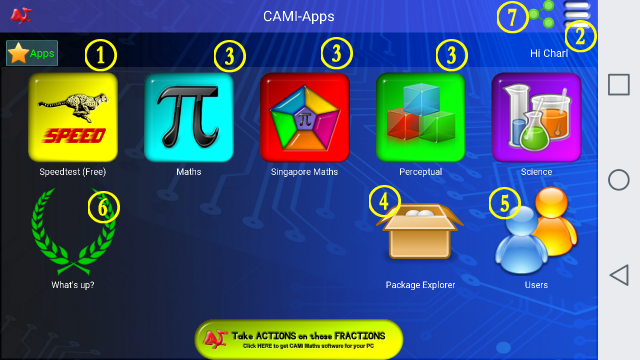
B. The Speed Test system is the essential software used for the practising of the Basic Numeracy operators of Addition, Subtraction, Multiplication and Division.
Learning the Times Tables forms the foundation of mathematics and it has been been proven over many years that a high level of numeric ability leads to easy understanding of higher level mathematics.
Clicking on item 1 brings the user to the Speed Test Menu.
C. The "Hamburger" icon gives access to the Settings, Documentation and other more sophisticated competition topics.
D. The CAMI-Apps system can be expanded by purchasing modules for Mathematics, Singapore Maths, Perceptual Skills development, and Science learning.
E. The Package Explorer indicates the content of the other Educational Software Packages that are available.
F. The Users icon leads to a page from where the additional users on the same Device can be managed.
G. The What's Up logo leads to the feedback system from where the Results of your learning activities can be seen.
H. The Share logo navigates to the Playstore/Appstore Site from where the software can be shared with other users.